
Spend where
it actually converts
Advertising data syncs in on the API cycle and is totalled at campaign, ad group, keyword and target level. Where something needs changing, we raise one suggestion: which object, what value, and on what basis. Nothing calls the API until you approve it, and both the old and the new value are written to the log.
The 365 day validity is Amazon's own requirement for application authorisations. You are reminded before it expires, and reauthorising keeps the service running. If it is never renewed, access stops on its own.
Fetching, deciding and changing are three separate jobs
Dozens of campaigns and hundreds of keywords sit in reports spread across several marketplaces. A manual pass takes hours and usually ends with "some campaigns are overspending" without saying which one, or by how much.
Changing them is harder to trace. Bid edits, pauses and budget increases get made and then forgotten. By the time the account drifts you cannot say which action caused it, what it was based on, or what the value was before.
Qiwang AdPilot connects the three: the machine fetches the data and works out the change, hands you the number and the reason, and waits for you before anything is sent.
Eight capabilities, each on a documented endpoint
Every item names the official API it depends on. Writes only touch advertising entities: bids, budgets and campaign status. Product content, prices and account permissions are out of scope.
Budget burn alerts
Tracks budget usage percentage. Campaigns that burn the daily budget by mid-morning are flagged, with a proposal to raise the budget or reweight bids.
Budget Usage API
Out-of-stock ad protection
Joins inventory to campaigns by SKU. When sellable stock falls below a threshold, every campaign advertising that SKU is listed for a proposed pause.
FBA Inventory
Zero-conversion term cleanup
Selects search terms and targets that passed your spend threshold with zero conversions, and proposes making them negative or pausing them.
Reports + Target
Official recommendation consolidation
Pulls Amazon's own bid, keyword and budget recommendations through one endpoint, then cross-checks and ranks them against actual performance.
Recommendations API
Competitor ad intelligence
Searches competitor advertising records across nine EU countries: advertiser, promoted product, start and end dates, creative type.
Ad Library API
Cross-marketplace portfolios
Manages structure at the portfolio level so marketplaces do not drift apart, while each market keeps its own data view.
Portfolios + Exports
Inventory-linked advertising
Flags campaigns to resume once a shipment lands, proposes a pause when stock drops below a safety line, and proposes an increase when stock is high and capped.
FBA Inventory + Sales
Rule oversight and rollback
Puts the bid and budget changes produced by Amazon's native rules into the same audit record, warns on conflicts, and rolls back to the previous value.
Rules reporting + Reports
Workbench preview
Six screens cover the whole chain: read the data, decide the action, then verify what was executed. The views below are illustrative and the data is sample data.
Performance analysis
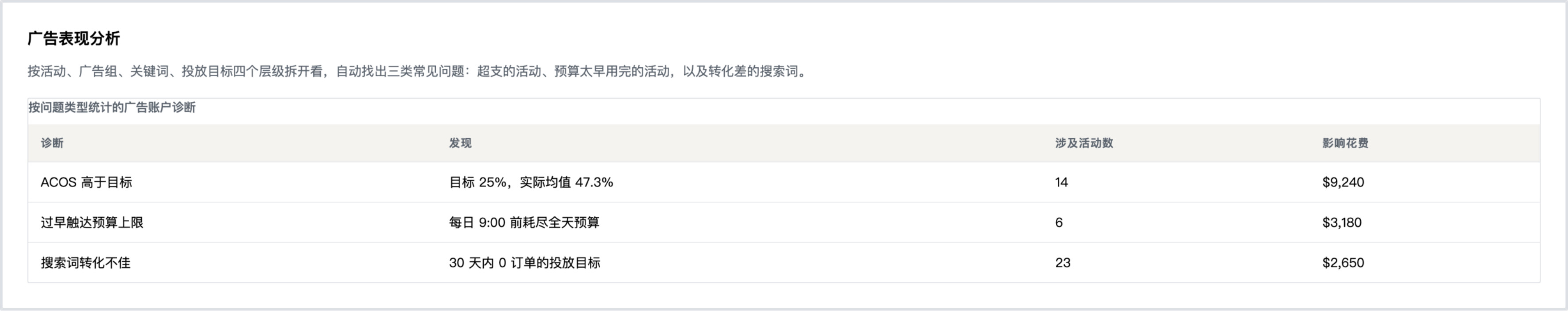
Performance is broken down at campaign, ad group, keyword and target level, and three common failure patterns are located automatically: campaigns overspending, campaigns budget-capped too early, and search terms that convert poorly.
| Diagnosis | Finding | Campaigns | Spend affected |
|---|---|---|---|
| ACOS above target | Target 25%, actual mean 47.3% | 14 | $9,240 |
| Budget capped too early | Full daily budget spent before 09:00 | 6 | $3,180 |
| Poor search term conversion | Targets with zero orders in 30 days | 23 | $2,650 |
Recommendations
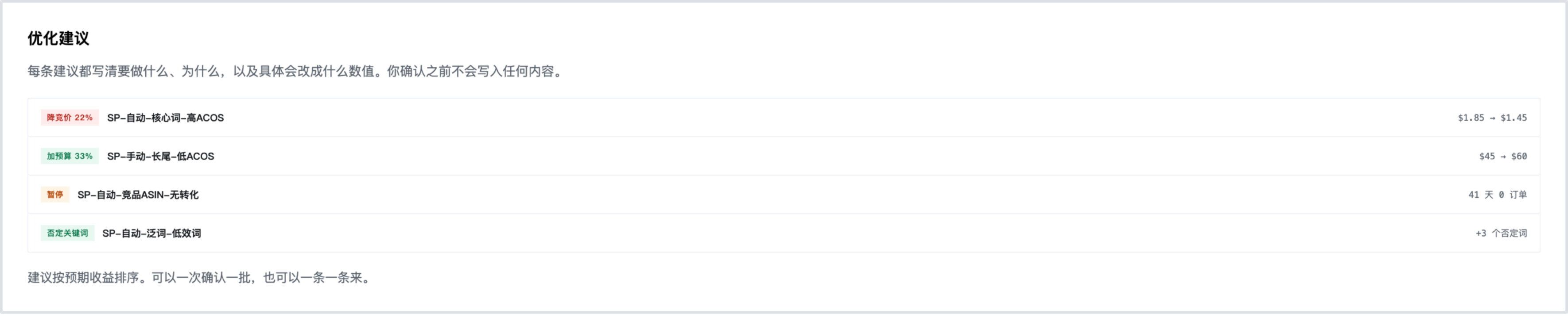
Every recommendation states the action, the reasoning and the exact value change that would be made. Nothing is written to your account before you confirm.
Recommendations are ranked by expected benefit. You can approve them in bulk within your guardrails, or work through them one at a time.
Audit log
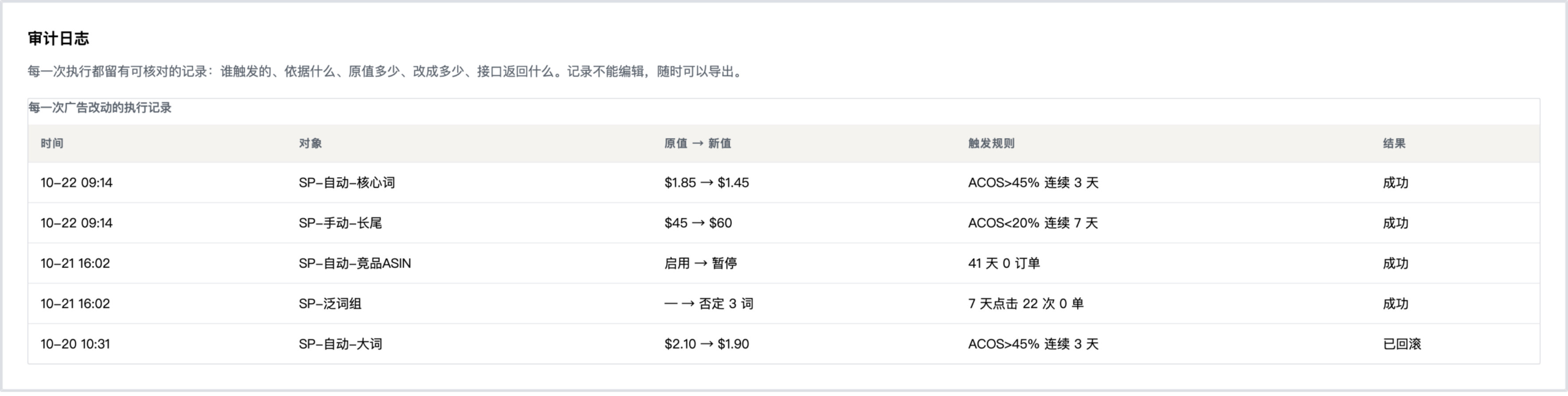
Every execution leaves a checkable record: what triggered it, on what basis, the previous value, the new value and the API result. Records cannot be edited and can be exported at any time.
| Time | Entity | Old → new | Trigger | Result |
|---|---|---|---|---|
| 10-22 09:14 | SP-auto-core | $1.85 → $1.45 | ACOS>45% for 3 days | Success |
| 10-22 09:14 | SP-manual-longtail | $45 → $60 | ACOS<20% for 7 days | Success |
| 10-21 16:02 | SP-auto-competitor | enabled → paused | 41 days, 0 orders | Success |
| 10-21 16:02 | SP-broad-group | — → 3 negatives | 22 clicks, 0 orders in 7 days | Success |
| 10-20 10:31 | SP-auto-broad | $2.10 → $1.90 | ACOS>45% for 3 days | Rolled back |
Guardrails
You set the limits and the system validates against them before the API call is made. A change that would exceed a limit is never sent, so it never happens.
Maximum change per adjustment
± 20% above this, blocked
Maximum daily spend per account
$500 total campaign budget cap
Target ACOS
25% above drives down, below drives up
Execution mode
Recommend + approve one click to read-only
Budget and alerts
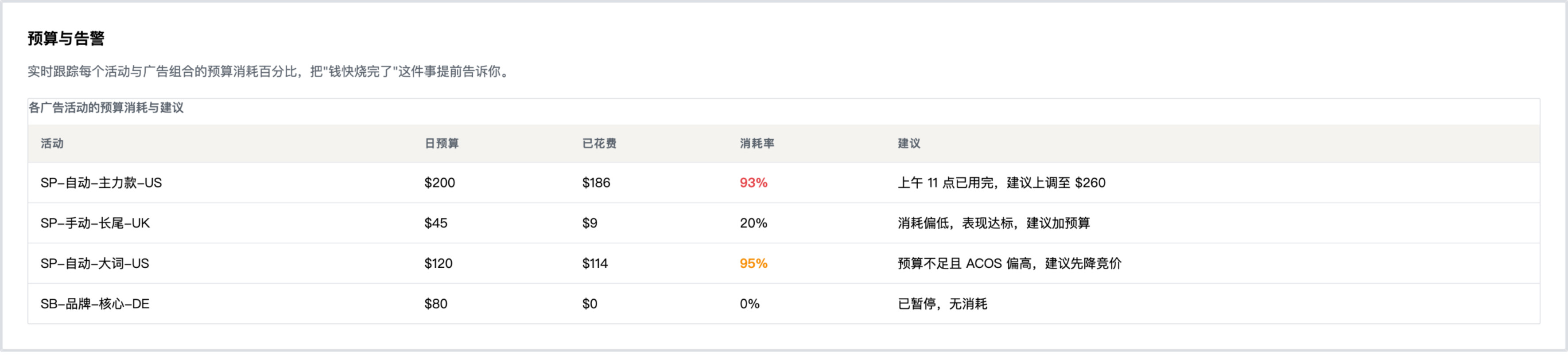
Tracks the budget usage percentage of every campaign and portfolio, so you learn that the money is nearly gone before it is gone.
| Campaign | Daily budget | Spent | Usage | Proposal |
|---|---|---|---|---|
| SP-auto-flagship-US | $200 | $186 | 93% | Exhausted by 11am, propose $260 |
| SP-manual-longtail-UK | $45 | $9 | 20% | Underused and performing, propose more budget |
| SP-auto-broad-US | $120 | $114 | 95% | Capped with high ACOS, lower the bid first |
| SB-brand-core-DE | $80 | $0 | 0% | Paused, no spend |
Competitor ad intelligence
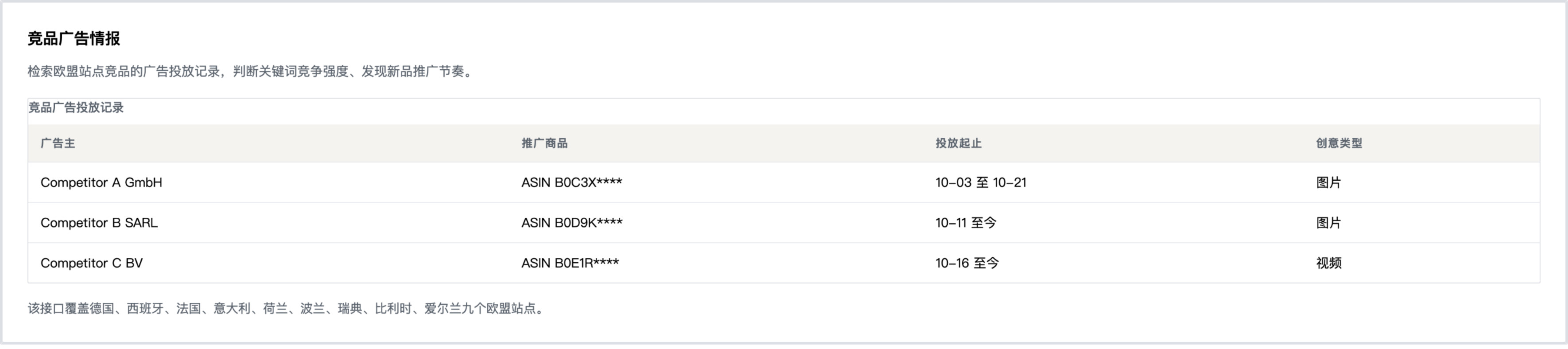
Searches competitor advertising records on EU marketplaces to judge keyword competition and spot new product launch timing.
| Advertiser | Promoted product | Flight dates | Creative type |
|---|---|---|---|
| Competitor A GmbH | ASIN B0C3X**** | 10-03 to 10-21 | Image |
| Competitor B SARL | ASIN B0D9K**** | 10-11 to present | Image |
| Competitor C BV | ASIN B0E1R**** | 10-16 to present | Video |
Covers nine EU marketplaces: Germany, Spain, France, Italy, Netherlands, Poland, Sweden, Belgium and Ireland.
Product demo
One complete run from authorisation to execution, six interfaces in order. To see it running against your own accounts, contact us to arrange a demonstration.

Real interface renders with sample data. The interfaces change between releases, so a render may differ from what you see now.
Request a demoFor a one to one demonstration or the product whitepaper, contact support@qiwangkj.com.
What the service does not do
These limits are built into the system, not just written into the terms.
Out of scope by design
- Does not modify product listings, titles, bullet points or images
- Does not change your product prices or reprice your catalogue
- Does not create, delete or transfer advertising campaigns
- Does not read customer personal information such as buyer names, addresses or contact details, and does not request a Restricted Data Token
- Does not change billing, payment or account permission settings
- Does not require your Amazon account password at any point
Controls you keep
- Maximum percentage change allowed per individual adjustment
- Maximum daily spend the service is permitted to set
- Target ACOS threshold used to decide which campaigns are over or under target
- A switch to pause all automation instantly, and to return to read-only mode
- Full export of the audit log for every account you authorise
What happens after you connect
Four steps, in a fixed order. Most customers see their first recommendation list within a week.
-
Authorise and connect
You complete the authorisation in the Amazon Ads console and we pull historical data as a baseline. Nothing for you to configure on day one, and you can revoke access at any time.
-
First recommendation list
We list the places in the account where something can be changed, with what changes, why, and to what value. This step is read-only and writes nothing.
-
Set the guardrails
You set limits to match your own risk appetite: maximum change size, maximum daily spend, target ACOS. These numbers cap everything that follows.
-
Switch on execution
Approved recommendations start being applied, and every change lands in the audit log. If you are not comfortable, switch back to read-only at any point.
We do not promise a specific return. Advertising results also depend on the market, the competition and the product itself. What we can commit to is this: every dollar the service moves can be traced to a rule, a value and a timestamp.
Data handling at a glance
This is a summary. The privacy policy is the authoritative document.
- What we are applying for
- Qiwang AdPilot serves multiple sellers. We are applying to join the Amazon Ads Partner Network and to register our developer profile in the Solution Provider Portal. Data comes in through the official Amazon Ads API, and through the official Selling Partner API where store and product data is needed. What this site describes matches those applications.
- The interface access we ask for
- On the Selling Partner API side we request three read-only roles only: Brand Analytics, Pricing and Inventory and Order Tracking. We do not request any role that exposes buyer personal information, and we do not request Restricted Data Tokens (RDT). Our interface calls therefore do not retrieve buyer names, addresses or phone numbers. Order and sales data is used only in aggregate form. On the advertising side we ask for the read and write access needed to operate an advertising account, and nothing more.
- Our relationship with Amazon
- Hangzhou Qiwang Technology Co., Ltd. is an independent software company. We are not affiliated with, endorsed by, or acting on behalf of Amazon or any of its subsidiaries, and we are not certified by Amazon. References to Amazon services identify the platform our software connects to. Your agreement with Amazon governs your use of Amazon services, and this site does not modify it.
| Data category | What is read | What is stored | Retention |
|---|---|---|---|
| Advertising performance | Campaigns, ad groups, ads, keywords, targets, spend, sales, clicks, impressions | Aggregated metrics and rule outputs | While the account is authorised, then deleted within 30 days of revocation |
| Change history | Not applicable | Every applied change with previous value, new value, trigger and result | 24 months, exportable by you at any time |
| Account identifiers | Amazon profile IDs, marketplace IDs, account names | Identifiers required to address the API | While the account is authorised |
| Customer personal data | Never read | Never stored | Not applicable |
Read the full privacy policy · Read the service terms · Read the security overview
Pricing
Charged per advertising account you authorise. The number of ad types in scope affects the price. Full detail is on the pricing page.
Recommendation only
USD 149/account/month
Read-only access. Billed monthly in advance, exclusive of tax.
Weekly analysis and a ranked proposal list. Nothing is written to your account. You make the changes yourself.
Managed execution
USD 399/account/month
Write access, bounded by your guardrails. Billed monthly in advance, exclusive of tax.
Recommendations are applied only after you approve them. Each change is checked against your limits first.
Quote based
Quoted per engagement
Scope, marketplaces, ad types and account count, written down.
Scoped to what you need. When neither model above fits, for example a narrow marketplace set or a large account portfolio, we quote per engagement.
Frequently asked questions
No. Authorisation happens entirely through Amazon's own authorisation flow. We never ask for, and never receive, your Amazon password or two-factor authentication codes. The service reaches your advertising accounts through the official Amazon Ads API.
In both modes the system produces the same recommendations, reasoning and expected effect. The difference is the confirmation step. In recommendation only mode nothing is written to your account. In managed execution mode you approve in bulk or one at a time, and the system applies the change after checking it against the limits you set. For a newly connected account we suggest running recommendation only for a while to confirm the quality of the recommendations before enabling execution.
No. The service acts only on advertising entities: bid values, budget values and campaign enabled status. Product content, prices, promotions, fulfilment settings, billing and account permissions are outside its scope. That limit is enforced in the system, not just agreed in writing.
The previous value of every changed entity is recorded before the change is applied, so an incorrect change can be identified and reversed. The audit log holds the previous value, the new value, the triggering rule, the timestamp and the API result, and you can export it at any time. Guardrails limit how far a change can deviate before it is even sent.
The subscription covers North America, Europe and Far East, with Sponsored Products, Sponsored Brands and Sponsored Display. Because demand and competition differ by marketplace, analysis results are presented separately per marketplace. Sponsored TV, Amazon DSP and Amazon Marketing Cloud are handled as a quote based engagement.
You revoke the authorisation in the Amazon Ads console at any time. Access stops within 24 hours and data is deleted on the schedule described in the privacy policy. If you only want to pause without revoking, the service offers a single switch to read-only mode or a full pause of automation.
Talk to us about your accounts
Send us a short description of the advertising accounts you would like to automate and the marketplaces they cover. We reply within one business day.
What happens next
-
1
We look at the account structure How many advertising accounts, which marketplaces, and where the spend sits.
-
2
We run it read-only first Nothing is written. For a week or two we list the places in the account worth changing.
-
3
You decide about execution After reading the recommendations, you set the guardrails and decide when writes start.